FAQ and Support
Data Safety
Is my data safe?
Yes, all data is stored locally on your device and protected by Android's system. We do not upload your personal data to any server.
When you make a purchase, the Google Play Store issues a ticket that through it we ask if there was a purchase made or not. Your user ID is not trackable by us to your Google ID.
Read more in our Privacy Policy.
Features
Is Blocker an Antispam App?
Yes, we think Blocker's approach is even better than the traditional Antispam filtering approach. Set UNKNOWN callers to NOTIFY. You get a subtle, pleasant "ping" instead of a loud disruption. Pick up if it's convenient or let it slide.
Spam will never be a problem any more, and you get full control over incoming calls without any imprecise filter interference.
Is Blocker better than a traditional Antispam app?
Yes, Blocker offers a more user-centric approach to managing incoming calls.
And unlike traditional Antispam apps that rely on significant daily battery consumption to filter calls based on caller ID and update their databases, Blocker is blazing fast and consumes minimal battery power.
How do I configure the necessary Android Permissions?
Read our extremely easy guide on that.
What happens with the calls that Blocker handles?
All calls that Blocker handles are shown in your Phone Call App's history. Blocker just gets in to prevent the call to RING for those groups you chose to NOTIFY and DROP.
Your call app will still show all notifications from received calls that you did not pick up.
Can I send calls straight to voicemail?
Yes. Voicemail is a carrier feature that handles calls under certain conditions. Blocker does not control this feature directly, but it respects your carrier’s voicemail settings.
If you set Blocker to DROP calls, they will go to voicemail if your line is set to Forward on Busy.
If you set Blocker to NOTIFY calls, the call will go to voicemail after the notification if your line is set to Forward on No Answer.
Check your carrier settings to confirm whether these features are available.
What happens if my device is muted or Do Not Disturb is enabled?
Blocker follows your device's Mute or Do Not Disturb settings. If your device is muted or Do Not Disturb is on, Blocker will not play short sounds on incoming calls. And calls will not ring. Unless they are PRIORITY CALLS following your device's settings. This ensures that you are not disturbed by unwanted calls when you have set your device to a quiet mode.
Blocker will follow your DND rules, priority calls and also allow Emergency calls from Emergency Services.
Does Block filter WhatsApp or Teams calls?
Currently, Blocker does not filter WhatsApp or Teams calls, nor any other call from apps. It only handles phone calls. This is a technical limitation of the Android platform.
Can a call be identified as "UNKNOWN" by Blocker, but the Phone Call App shows it as a Contact?
Very rarely. It is possible. Some Phone Call Apps have a very aggressive strategy to identify contacts, which, by the way, can sometimes lead to a mismatch. Especially if the number in the Phone Book was recorded without the long-distance prefix.
Blocker tries to align with most vendor strategies to identify contacts.
Can Blocker rarely miss a call and let the phone ring by mistake?
Unfortunately, yes. This happens because of external reasons, not Blocker.
Heavy system load, device aggressive battery optimizations, processes dormancy. Sometimes also Android fails to handle the incomming call to blocker and rings anyway.
Make sure Blocker is not in an app dormant list.
Some spammers may have GSM network privileged access and put calls with special flags, like an emergency call, that Android does not handle to Blocker. They also put two calls in a very fast sequency to trick Android. And the call firmware may sometimes not be fast and smart enough to deal with those exceptional and rare cases.
So Blocker isn't perfect, but it is worth it?
YES! For sure! 100%. All the users that tested Blocker in its early phase reported starting to have a more healthy and peaceful relationship with mobile phone calls.
It is a life changer for most of them. Don't take our word for granted. Try Blocker for a few days and see for yourself.
Can I temporarily disable Blocker?
Yes. Setting all calls to RING is the easiest way.
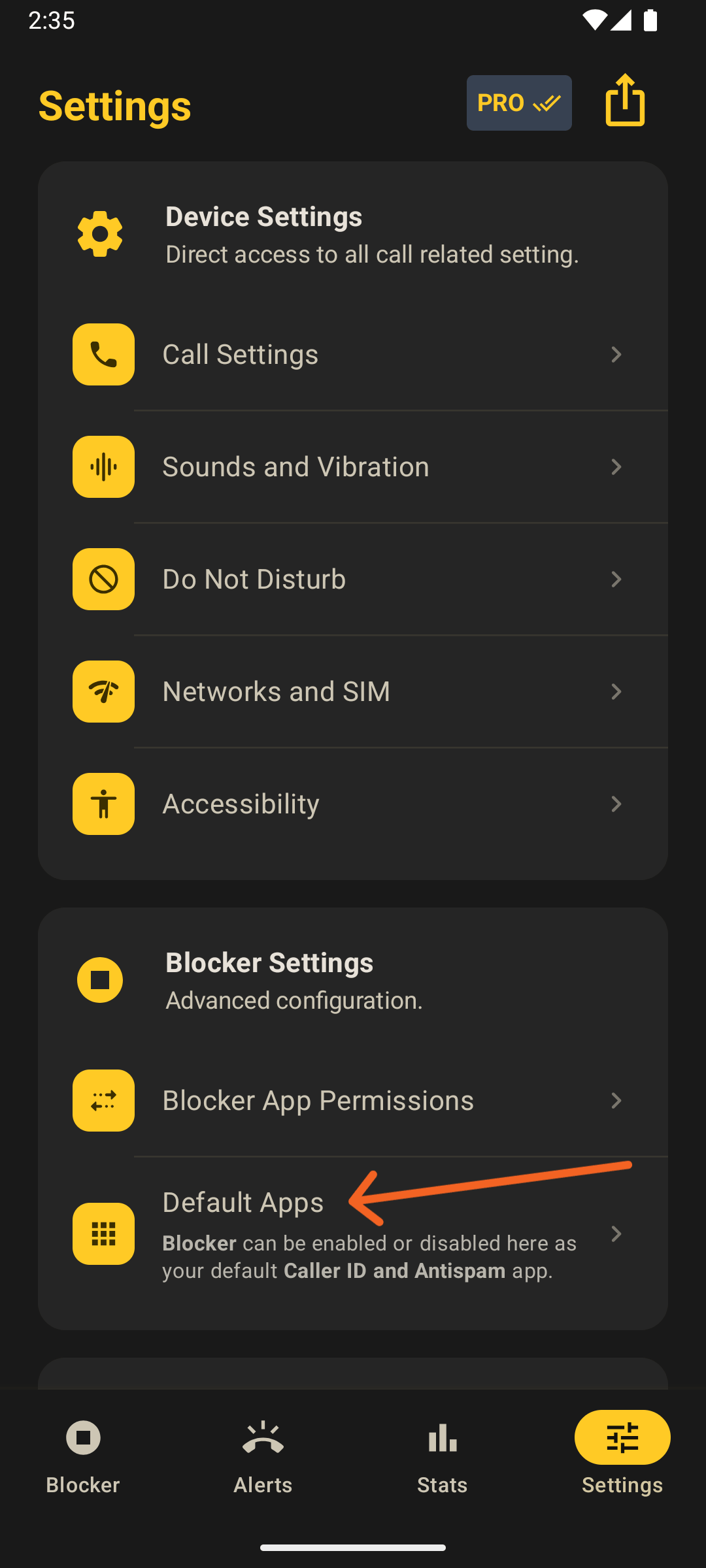
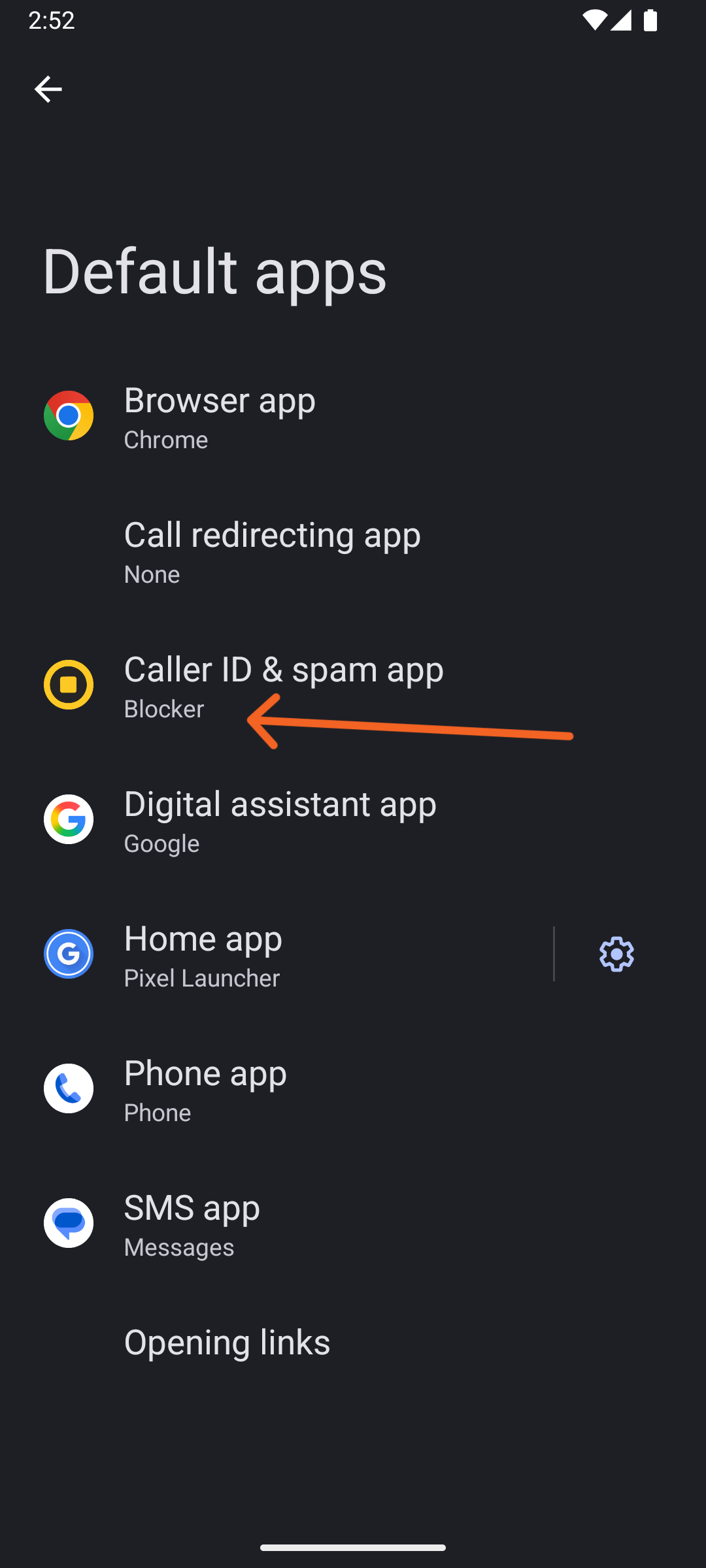
But if for some reason you need Blocker temporarily not to intercept calls, go to Settings → Default Apps → Caller ID and Antispam App and chose None or another app for the moment.
Blocker will then show you the top banner asking your permission to be the "Caller ID and Antispam App" whenever you please to do so again.
Other
What happens with the numbers I blocked in my device's Phone App
They will still be blocked by Android. They won't even ring or appear in Blocker stats.
How do I restore my purchase?
It should be automatically handled by Blocker. But you can manually click on Settings > Restore purchases. Make sure you are logged in your device into the same Google account used to buy the app.
Is there an iPhone version?
Not yet, but we are analysing the possibility.
Issues
Short sounds are not being played
If the device is under heavy load constraints, short sounds may not play to prioritize call handling. This is usually not the case with modern device hardware.
What to do if the app is crashing?
That should not be happening at all. Our apologies. Please try clearing the app cache or reinstalling it (call history stats will be lost in this case, so be careful and use it as a last resort). If the issue persists, contact us below specifying your device model and OS version. We will do our best to fix it as soon as possible.
Contact
Can't find what you’re looking for? Contact us here for technical support, app crashes, or legal issues.